Using Secure Boot on Arch Linux with GRUB
#include metadata.h
// Created Feb 25, 2026
// Last updated Mar 4, 2026
Table of Contents
I recently set up Secure Boot on Twilight (my laptop). It works well, but the ArchWiki's documentation was a little confusing to follow, so I wrote this guide that targets GRUB. I have changed my setup significantly and I'm using systemd-boot now, but I'm leaving this here in case someone else finds it useful.
Its always slightly bothered me that my systems (especially my laptop) aren't really that secure (I'm not joking, you get full access to them simply by booting up a live Linux image and mounting the internal drive and then you can do basically anything) so I'm taking some steps to minimize the risks. This basically just boils down to 1) enabling Secure Boot so only trusted OSes (and Windows) can boot, and 2) encrypting the internal drive so that you can't mount it in a live environment without knowing the secret to unlocking it. I've done Secure Boot first since it's the simpler option to implement and also fairly low-risk (the worst that could happen was nuking my bootloader and that's not that hard to fix).
Preliminaries
So the first thing to consider was how exactly I was going to make my installation Secure Boot compatible. The ArchWiki's page on Secure Boot outlines two main approaches: Using your own keys directly (enrolling them in the UEFI Secure Boot database) or using a chain loader signed with Microsoft's 3rd party UEFI CA key (already enrolled in most PCs' Secure Boot databases) that validates your real bootloader via a machine owner key (MOK) or its SHA256 hash.
I chose the second approach simply because at the time it seemed simpler and the first approach has big red warnings all over the place saying that if you mess up you can actually soft-brick your PC. However if you do get it to work the first approach is way more elegant (it doesn't require an extra chainloader so less confusion with EFI boot entries).
Initial setup
So the first thing to do is get shim, a chainloader used by multiple well-known distros for Secure Boot support. It's available in the AUR as shim-signed. Then, the shim and MokManager binaries from that package need to be copied to the ESP. I'm going to put the files in /EFI/arch on my ESP (this is actually the default location for GRUB on Arch Linux when no bootloader-id is given to grub-install).
The files are shimx64.efi and mmx64.efi and are located in /usr/share/shim-signed. For command-line lovers, here are the commands to copy the files:
# cp /usr/share/shim-signed/shimx64.efi /efi/EFI/arch/
# cp /usr/share/shim-signed/mmx64.efi /efi/EFI/arch/
Now you need to create a machine owner key (MOK) that will be enrolled using MokManager (mmx64.efi) and is used to sign the kernel and GRUB. These two commands will create an MOK you can use:
$ openssl req -newkey rsa:2048 -nodes -keyout MOK.key -new -x509 -sha256 -days 3650 -subj "/CN=your MOK/" -out MOK.crt
$ openssl x509 -outform DER -in MOK.crt -out MOK.cer
The MOK.key file is the private key used to sign the kernel and GRUB; MOK.crt is the certificate tied to the key used in signing GRUB and the kernel and MOK.cer is a different format of the certificate that shim/MokManager use for verification.
Note: MOK.key should not be shared with anyone.
Configuring GRUB
GRUB out of the box will not be very Secure Boot compliant. It stores its modules in separate files and dynamically loads them at boot; with this approach we can't do that so instead all the modules necessary to boot must be embedded in GRUB's main EFI binary, grubx64.efi. Shim also requires that the binary has a Secure Boot Advanced Targeting (SBAT) section in it (which it uses to prevent versions of GRUB with known vulnerabilities from loading even if they otherwise pass the checks). GRUB provides one at /usr/share/grub/sbat.csv that we can use.
We'll set the list of modules GRUB needs as a shell variable to ease our pain when typing out the install command. I apologize in advance for the extremely long list (which is taken from Ubuntu's build script).
GRUB_MODULES="
    all_video
	bli
	boot
	btrfs
	cat
	chain
	configfile
	echo
	efifwsetup
	efinet
	ext2
	fat
	font
	gettext
	gfxmenu
	gfxterm
	gfxterm_background
	gzio
	halt
	help
	hfsplus
	iso9660
	jpeg
	keystatus
	loadenv
	loopback
	linux
	ls
	lsefi
	lsefimmap
	lsefisystab
	lssal
	memdisk
	minicmd
	normal
	part_apple
	part_msdos
	part_gpt
	password_pbkdf2
	png
	probe
	reboot
	regexp
	search
	search_fs_uuid
	search_fs_file
	search_label
	serial
	sleep
	smbios
	squash4
	test
	tpm
	true
	video
	xfs
	zfs
	zfscrypt
	zfsinfo
	cpuid
	play
	cryptodisk
	gcry_arcfour
	gcry_blowfish
	gcry_camellia
	gcry_cast5
	gcry_crc
	gcry_des
	gcry_dsa
	gcry_idea
	gcry_md4
	gcry_md5
	gcry_rfc2268
	gcry_rijndael
	gcry_rmd160
	gcry_rsa
	gcry_seed
	gcry_serpent
	gcry_sha1
	gcry_sha256
	gcry_sha512
	gcry_tiger
	gcry_twofish
	gcry_whirlpool
	luks
	lvm
	mdraid09
	mdraid1x
	raid5rec
	raid6rec
	"
Okay, now we can reinstall GRUB.
# grub-install --target=x86_64-efi --efi-directory=/efi --boot-directory=/efi --modules="${GRUB_MODULES}" --sbat /usr/share/grub/sbat.csv
This version of GRUB has all its modules embedded in the EFI binary as well as the SBAT section shim requires. Fun fact: Shim seems to be the only software that actually implements SBAT. Almost no UEFI firmware actually does SBAT verification.
Signing GRUB and the kernel
However there is still one problem. The GRUB binary isn't signed and so shim cannot verify it! Let's sign it now.
First install sbsigntools, and then run the following commands to sign both your kernel and GRUB (if you leave the kernel unsigned GRUB will refuse to load it for obvious reasons):
# sbsign --key MOK.key --cert MOK.crt --output /boot/vmlinuz-linux /boot/vmlinuz-linux
# sbsign --key MOK.key --cert MOK.crt --output /efi/EFI/arch/grubx64.efi /efi/EFI/arch/grubx64.efi
When the kernel and GRUB are updated they need to be resigned with the same key otherwise shim will not trust them. For the kernel, which is updated fairly often on Arch, this can be automated with an mkinitcpio post hook. Create /etc/initcpio/post/kernel-sbsign with the following content and make it executable:
#!/bin/bash

kernel="$1"
[[ -n "$kernel" ]] || exit 0

# use already installed kernel if it exists
[[ ! -f "$KERNELDESTINATION" ]] || kernel="$KERNELDESTINATION"

key=/usr/local/share/keys/MOK.key
cert=/usr/local/share/keys/MOK.crt

if ! sbverify --cert "$cert" "$kernel" &>/dev/null; then
    sbsign "$kernel" --key "$key" --cert "$cert" --output "$kernel"
fi
I copied my keys to the location you see in the script for easier access. Just remember where they are lol.
Now, copy the MOK.cer file to your ESP. This is so MokManager can access it to enroll it.
Finally, you need to create a boot entry for shimx64.efi. If you do this immediately after installing shim and before reinstalling GRUB, the entry will be overwritten and try to launch GRUB directly rather than going through shim.
# efibootmgr --unicode --disk /dev/sdX --part Y --create --label "Arch" --loader /EFI/arch/shimx64.efi
Replace the disk and partition number with the actual one for your ESP (on Twilight, the disk is /dev/nvme0n1 and the ESP is partition 4).
Enabling Secure Boot
Reboot into UEFI setup and enable Secure Boot (often found under "Security"). Save and exit setup. When shim doesn't find the key GRUB is signed with it'll launch MokManager which will throw a security violation. Select OK then Enroll key from disk. Locate the MOK.cer file and enroll it. Once enrolled, select Reset and the system should boot like normal.
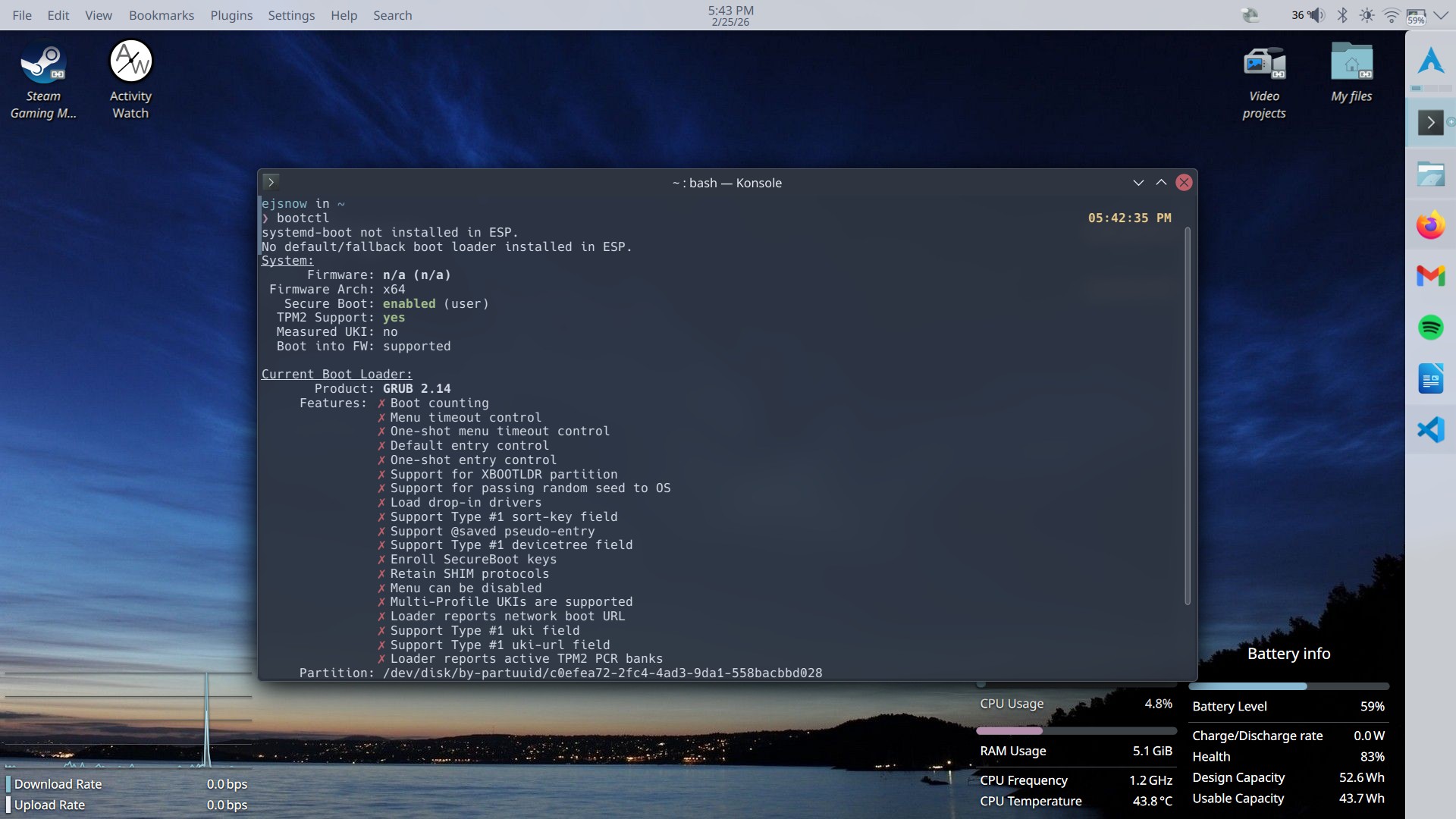
And that's it! There's an additional script and Pacman hook to automate the signing of GRUB below, but I don't consider them to be that useful since GRUB isn't updated very often. Still nice to know that it's taken care of when GRUB does update.
Additional scripts
This is a Pacman hook and script to automate the installation and signing of a new GRUB version.
Pacman hook:
In /etc/pacman.d/hooks/sbupdate-grub.hook:
[Trigger]
Operation = Upgrade
Type = Package
Target = grub

[Action]
Depends = sbsigntools
When = PostTransaction
Description = "Installing and signing new GRUB version"
Exec = /usr/local/bin/sbupdate-grub
Script:
In /usr/local/bin/sbupdate-grub (must be executable):
#!/bin/bash

# Automatically reinstalls GRUB with Secure Boot compatibility and signs the updated binary
GRUB_MODULES="
    all_video
	bli
	boot
	btrfs
	cat
	chain
	configfile
	echo
	efifwsetup
	efinet
	ext2
	fat
	font
	gettext
	gfxmenu
	gfxterm
	gfxterm_background
	gzio
	halt
	help
	hfsplus
	iso9660
	jpeg
	keystatus
	loadenv
	loopback
	linux
	ls
	lsefi
	lsefimmap
	lsefisystab
	lssal
	memdisk
	minicmd
	normal
	part_apple
	part_msdos
	part_gpt
	password_pbkdf2
	png
	probe
	reboot
	regexp
	search
	search_fs_uuid
	search_fs_file
	search_label
	serial
	sleep
	smbios
	squash4
	test
	tpm
	true
	video
	xfs
	zfs
	zfscrypt
	zfsinfo
	cpuid
	play
	cryptodisk
	gcry_arcfour
	gcry_blowfish
	gcry_camellia
	gcry_cast5
	gcry_crc
	gcry_des
	gcry_dsa
	gcry_idea
	gcry_md4
	gcry_md5
	gcry_rfc2268
	gcry_rijndael
	gcry_rmd160
	gcry_rsa
	gcry_seed
	gcry_serpent
	gcry_sha1
	gcry_sha256
	gcry_sha512
	gcry_tiger
	gcry_twofish
	gcry_whirlpool
	luks
	lvm
	mdraid09
	mdraid1x
	raid5rec
	raid6rec
	"

grub_location="/efi/EFI/arch/grubx64.efi"

grub-install --target=x86_64-efi --efi-directory=/efi --boot-directory=/efi --modules="${GRUB_MODULES}" --sbat /usr/share/grub/sbat.csv
grub-mkconfig -o /efi/grub/grub.cfg
key=/usr/local/share/keys/MOK.key
cert=/usr/local/share/keys/MOK.crt

if ! sbverify --cert "$cert" "$grub_location" &>/dev/null; then
    sbsign "$grub_location" --key "$key" --cert "$cert" --output "$grub_location"
fi
Note that this script is hardcoded to my setup with the ESP mounted at /efi.